
Babylon Lite is the engine we've always dreamed of building — a 3D engine started from a blank page, with no legacy to carry, built directly on top of modern GPU APIs and a modern toolchain. It is a WebGPU-exclusive, tree-shakable, data-oriented renderer, engineered for an unprecedentedly small bundle size and high performance — while producing output that is pixel-for-pixel identical to the beautiful rendering you've come to expect from Babylon.js. Babylon Lite is not a replacement for Babylon.js. The two engines move forward side by side, as one family. They simply optimize for different things — so you can pick the right tool for the job.
Measured live across our full parity test suite (100+ scenes), comparing the exact same scene built in each engine.
| Metric | Babylon Lite vs Babylon.js |
|---|---|
| Bundle size (gzipped JS) | ~19× smaller on average; up to 50× on focused scenes |
| Frame time (RAF CPU) | ~3–4× faster |
| Startup time | ~2.5× faster |
| Memory | ~5× less |
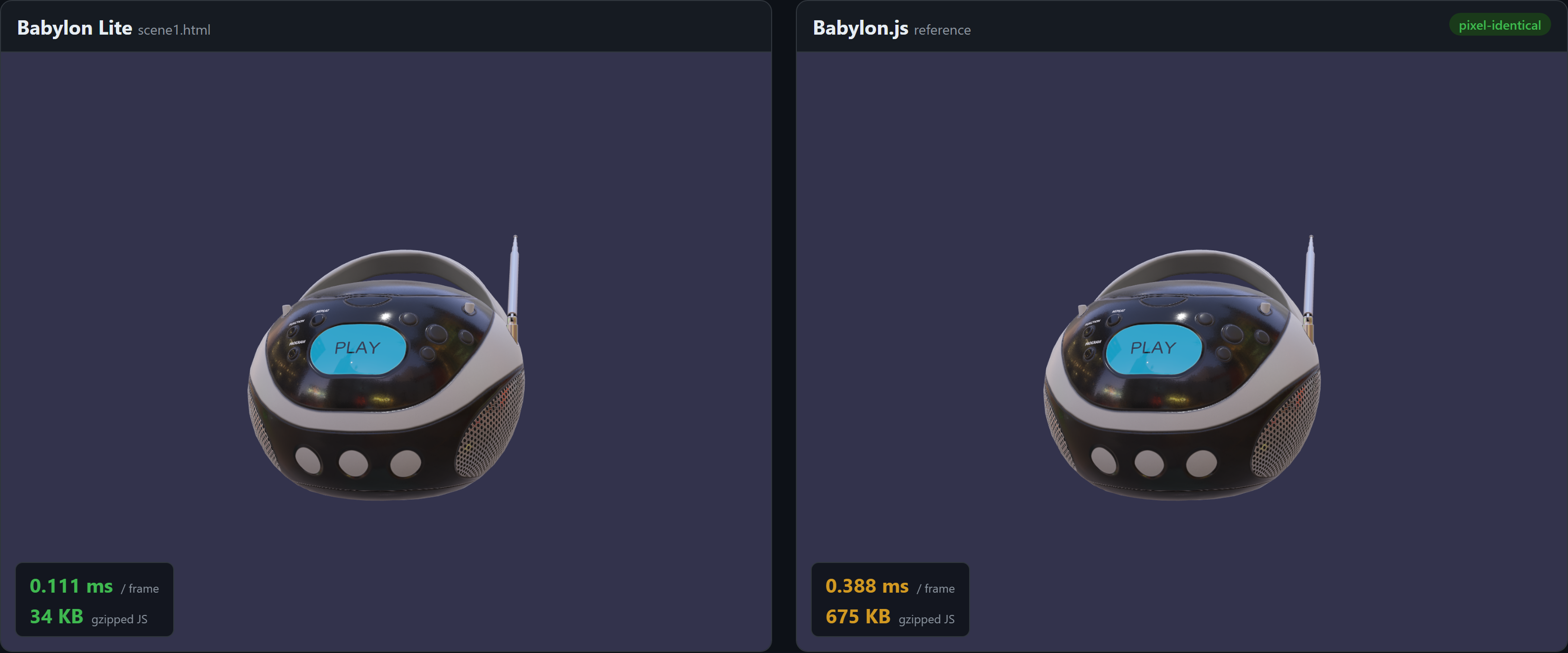
For the BoomBox PBR scene below, that's 34 KB vs 675 KB gzipped (84.5 KB vs 2.8 MB raw) — the same image, a fraction of the download.
There are no wrong answers — and because the APIs share the same shape, you can switch later knowing the pixels won't change.
| If you want… | Choose |
|---|---|
| The smallest possible bundle size, the highest performance, ship-only-what-you-use | Babylon Lite |
| The broadest feature set, WebGL and WebGPU support, and rock-solid backward compatibility | Babylon.js |
| To learn 3D on the modern web from a clean, classless API | Babylon Lite |
| To ship a production app today that depends on the full Babylon feature set | Babylon.js |
Moving a scene to Babylon Lite is meant to feel familiar. The API is different — there are no classes, and behavior lives in standalone functions rather than methods — but it is still similar in shape and naming, so the concepts carry over directly.
import { WebGPUEngine } from "@babylonjs/core/Engines/webgpuEngine";
import "@babylonjs/core/Helpers/sceneHelpers";
import { HemisphericLight } from "@babylonjs/core/Lights/hemisphericLight";
import { SceneLoader } from "@babylonjs/core/Loading/sceneLoader";
import { CubeTexture } from "@babylonjs/core/Materials/Textures/cubeTexture";
import { Vector3 } from "@babylonjs/core/Maths/math.vector";
import { Scene } from "@babylonjs/core/scene";
import "@babylonjs/loaders/glTF";

const engine = new WebGPUEngine(canvas, { antialias: true, adaptToDeviceRatio: true });
await engine.initAsync();
const scene = new Scene(engine);

const light = new HemisphericLight("hemi", new Vector3(0, 1, 0), scene);
light.intensity = 1.0;

await SceneLoader.ImportMeshAsync("", "https://playground.babylonjs.com/scenes/", "BoomBox.glb", scene);
scene.environmentTexture = new CubeTexture("https://assets.babylonjs.com/core/environments/environmentSpecular.env", scene);
scene.createDefaultCamera(true, true, true);
scene.createDefaultEnvironment({ createSkybox: true, createGround: true, skyboxSize: 1000 });

engine.runRenderLoop(() => scene.render());import {
createEngine,
createSceneContext,
createDefaultCamera,
createHemisphericLight,
loadGltf,
loadEnvironment,
addToScene,
attachControl,
registerScene,
startEngine,
} from "babylon-lite";
const engine = await createEngine(canvas);
const scene = createSceneContext(engine);
addToScene(scene, createHemisphericLight([0, 1, 0], 1.0));
addToScene(scene, await loadGltf(engine, "https://playground.babylonjs.com/scenes/BoomBox.glb"));
await loadEnvironment(scene, "https://assets.babylonjs.com/core/environments/environmentSpecular.env", {
groundTextureUrl: "https://assets.babylonjs.com/core/environments/backgroundGround.png",
skyboxUrl: "https://assets.babylonjs.com/core/environments/backgroundSkybox.dds",
skyboxSize: 1000,
});
const cam = createDefaultCamera(scene);
attachControl(cam, canvas, scene);
await registerScene(scene);
await startEngine(engine);The shape is the same: create an engine, build a scene, add a light, load a glTF, set up the environment and camera, then run. The difference is that Lite hands you plain data plus tree-shakable functions instead of classes and methods — which is exactly what lets the bundler strip everything you don't use.
Babylon Lite is WebGPU-only, so it runs anywhere WebGPU is available: Chrome and Edge 113+, and recent Firefox and Safari. There is no WebGL fallback by design.
Yes — bringing Lite up toward Babylon.js feature parity is our top priority. Features land as isolated, tree-shakable modules, so the engine grows without bloating your bundle.
A given scene is built with one engine or the other. Because the APIs are similar in shape, the concepts and assets (glTF, .env, textures) carry straight across when you choose which engine fits a project.
Lite is young and the API may still evolve as we close the feature gap. It is fully open source and usable today — we'd love early adopters, with the caveat that some APIs can change before we stabilize.
It means visually indistinguishable, enforced by an automated per-scene MAD threshold in CI. The goal is Babylon.js-quality output you can't tell apart by eye.
Babylon Lite is open source and available now. Explore the code, browse the scene gallery, and follow along with development. Star the repo, open an issue, and tell us what you'd want before reaching for Lite.